

If you’ve been wondering whether your pages have too many or too few internal links, you’re asking an important SEO question. The right number of internal links can improve navigation, help search engines understand your content, and support higher rankings. This blog explains how to use internal links effectively without overdoing them.
For businesses in Houston, a well-planned internal linking strategy can make it easier for both users and search engines to navigate your website. An experienced SEO agency Houston can identify linking opportunities, strengthen your site architecture, and help improve your overall search visibility while keeping your content user-friendly.
What Is an Internal Link?
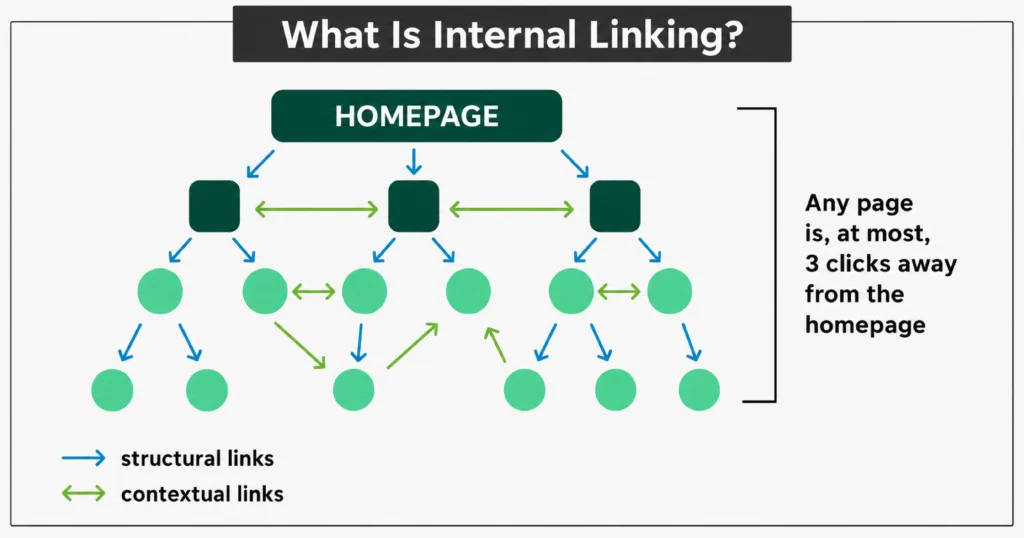
An internal link is a hyperlink that connects one page of your website to another page on the same domain. Through structural links (such as navigation) and contextual links within content, internal linking helps users reach important pages in just a few clicks while making it easier for search engines to crawl, index, and understand your site’s structure. It also distributes link equity, helping valuable pages gain greater visibility in search results.
The Science Behind Internal Link Quantity
A Zyppy SEO study analyzing 23 million internal links found that pages with 45–50 internal links often experienced higher organic traffic. Beyond that range, adding more links showed diminishing returns, as link equity is spread across more pages, reducing the value passed through each individual link.
Why Isn’t There a Fixed Number of Internal Links Per Page?
There is no universal rule for the ideal number of internal links because every website and page has a different purpose. Instead of following a fixed number, focus on adding relevant links that improve navigation, support your SEO strategy, and help users find valuable information. The ideal number depends on factors such as:
- Content length: A good rule is 5–10 internal links per 1,000 words. For example, a 500-word page may need 2–5 links, while a 2,000-word article can naturally include 10–20 links.
- User experience: Every internal link should provide additional value and help readers navigate to related content instead of distracting them.
- Website structure: Blogs, service websites, and eCommerce stores have different internal linking needs based on how their pages are organized.
- Page importance: Prioritize linking to cornerstone content, service pages, and other high-value pages that you want to rank higher in search results.
- Content relevance: Only add links that are contextually related to the topic to improve usability and help search engines understand the relationship between pages.
So, How Many Internal Links Are Too Many?
There is no official limit, but adding more internal links than necessary can reduce their effectiveness and make your content harder to navigate. If your page feels cluttered or includes links that don’t provide additional value, you’ve likely added too many. Focus on quality over quantity by linking only to relevant pages that improve the user experience.
Types of Internal Links and When to Use Each
Internal links serve different purposes depending on where they appear on your website. Using the right type of internal link helps users navigate your content more easily while improving your site’s structure for search engines.
1. Contextual Links
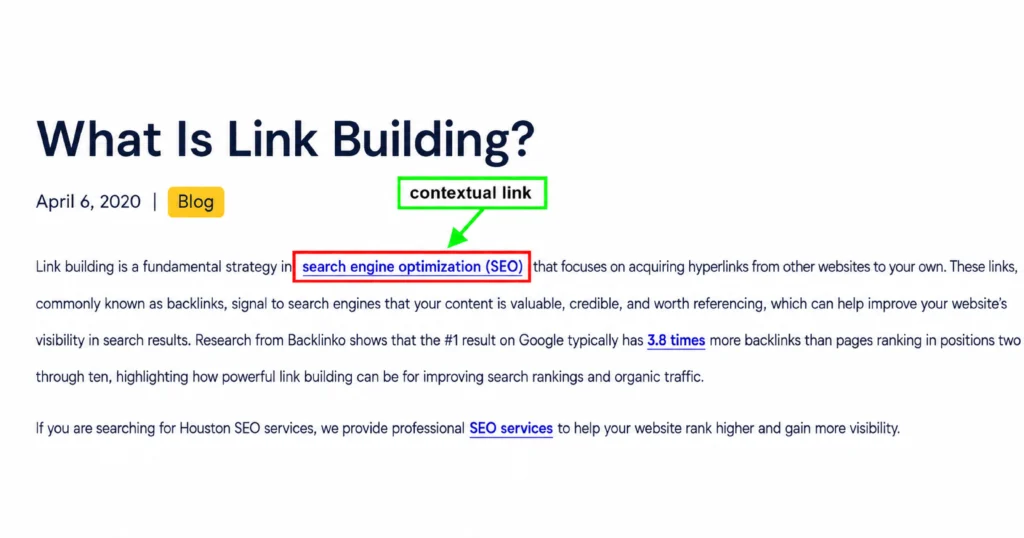
Contextual links are placed naturally within the main body of your content and connect readers to related pages. They are the most valuable type of internal link because they provide additional information exactly when users need it. Use contextual links to connect blog posts, guides, service pages, and other relevant resources that support the topic being discussed.
2. Navigation Links
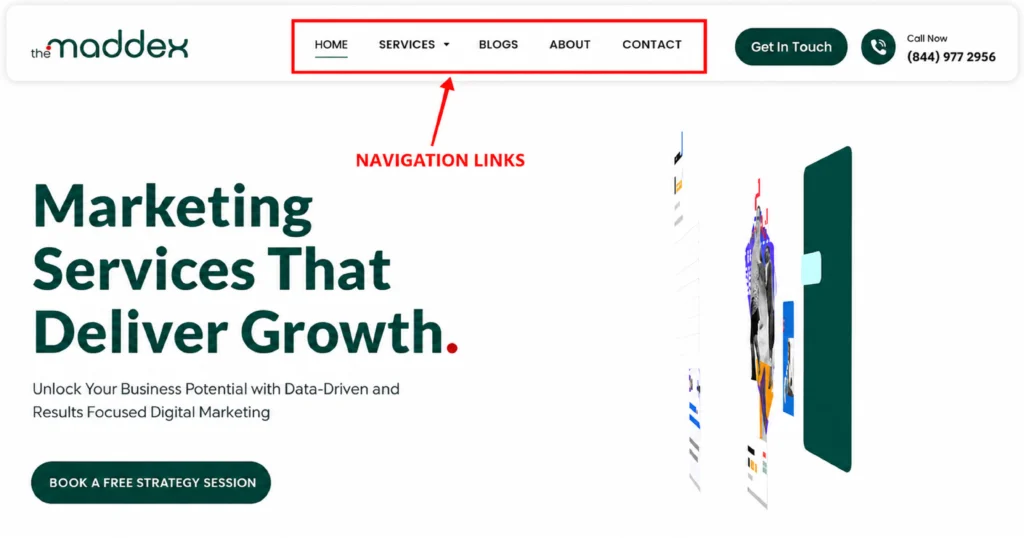
Navigation links appear in your website’s main menu or header and help users access important pages from anywhere on your site. They typically point to core pages such as Home, About, Services, Blog, and Contact. Use navigation links for high-priority pages that visitors should be able to find quickly and easily.
3. Footer Links
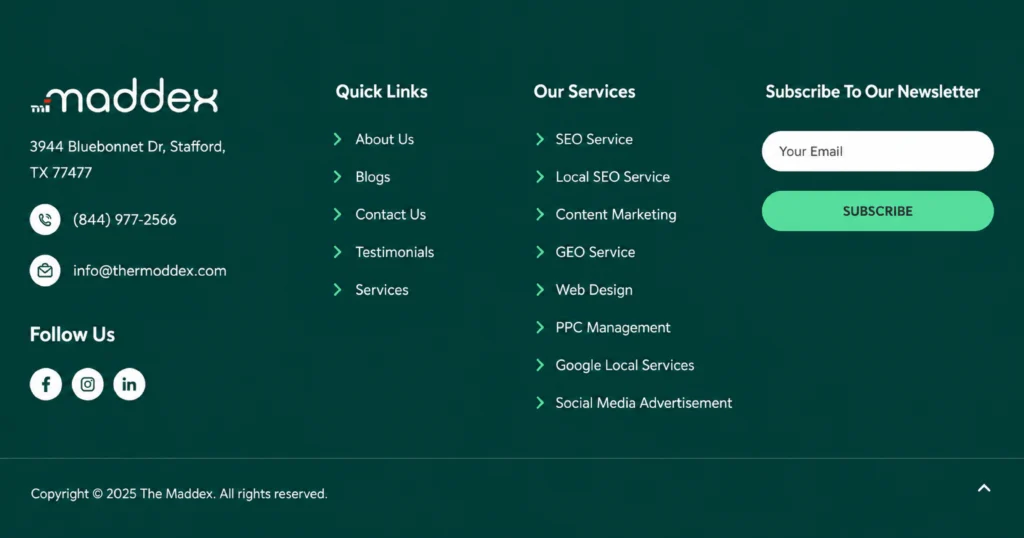
Footer links are located at the bottom of every page and provide quick access to essential information. They commonly link to pages such as Privacy Policy, Terms of Service, Contact, FAQs, or key service pages. Use footer links for important resources that should remain accessible across your entire website without cluttering the main navigation.
4. Sidebar Links
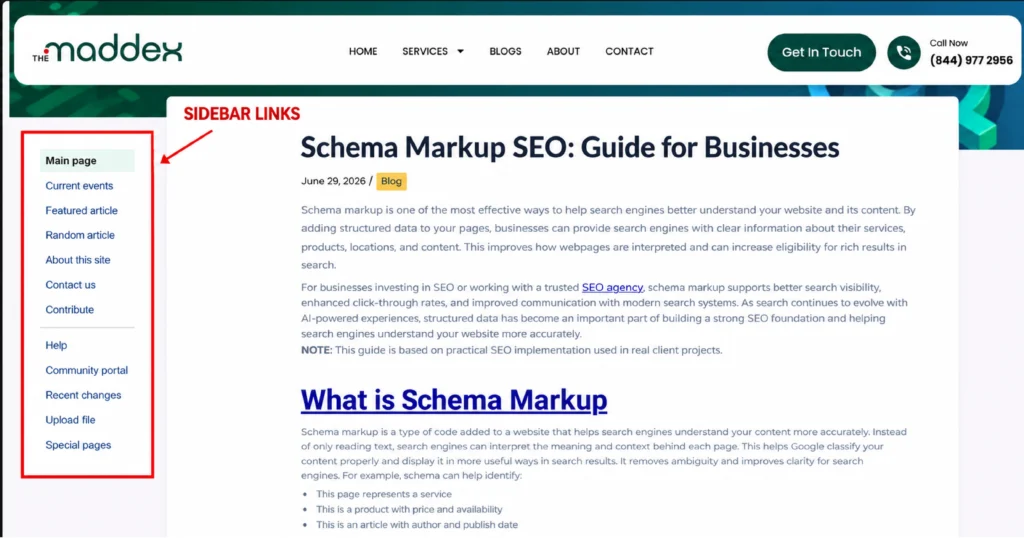
Sidebar links appear alongside the main content and direct users to related articles, popular posts, categories, or featured pages. They encourage visitors to continue exploring your website and can increase engagement. Use sidebar links to promote relevant content without interrupting the flow of the main article.
What Is Link Juice and How Does It Flow Through Internal Links?
Link juice is the SEO value passed from one page to another through internal links. When a high-authority page links to a relevant page on your website, it shares some of its ranking power, helping improve the linked page’s visibility and overall SEO.
How to Maximize Link Juice with Smart Internal Linking
- Link from High-Authority Pages: Add internal links from pages that already perform well to pass more authority to other important pages.
- Prioritize Key Pages: Direct link juice to cornerstone content, service pages, and other pages you want to rank higher.
- Use Descriptive Anchor Text: Choose relevant anchor text that clearly describes the destination page.
- Keep Links Contextual: Place internal links naturally within the content where they provide the most value.
- Avoid Overloading Pages: Include only relevant internal links so each one passes meaningful SEO value.
- Update Existing Content: Add links from older, authoritative pages to new content to improve its visibility and indexing.
A strong internal linking strategy requires careful planning to improve website structure and SEO performance. If you need expert guidance, partnering with a digital marketing agency Houston can help create effective linking strategies, improve page visibility, and enhance your website’s overall search performance.
How the Hub and Spoke Model Improves Internal Linking
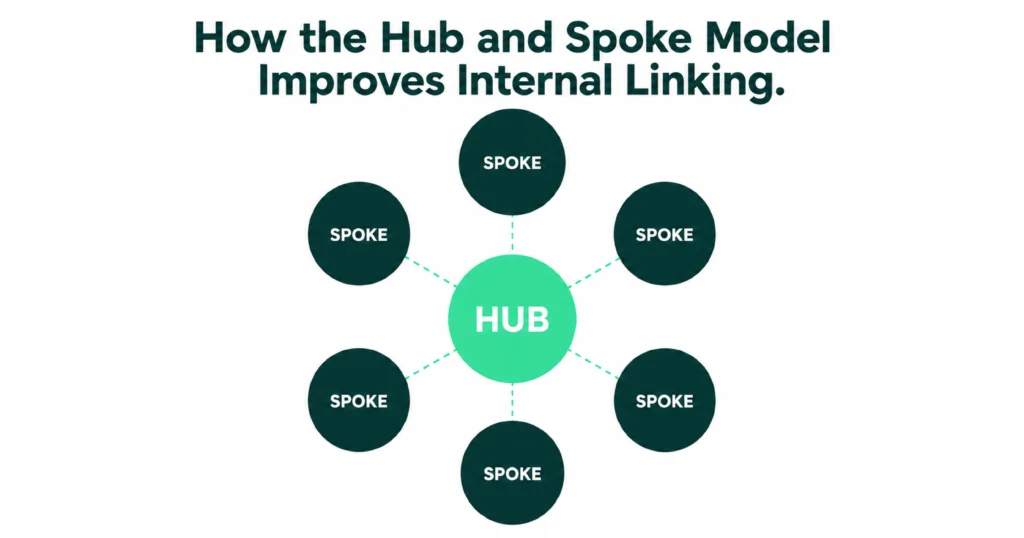
The Hub and Spoke Model is an internal linking strategy that connects a central hub page with multiple related spoke pages. The hub links to each supporting page, and the spoke pages link back to the hub, creating a well-organized content structure that improves navigation and strengthens internal linking for both users and search engines.
How the Hub and Spoke Model Improves Internal Linking
- Creates a Clear Site Structure: Organizes related pages around one central topic.
- Prevents Orphan Pages: Ensures every important page is connected through internal links.
- Distributes Link Equity: Shares SEO value between the hub and supporting pages.
- Improves Link Relevance: Connects pages with similar topics and search intent.
- Enhances User Navigation: Makes it easier for visitors to find related content.
- Supports Content Growth: Allows you to add new pages without disrupting your internal linking structure.
Best Internal Linking Strategies for Better SEO
An effective internal linking strategy connects related pages to improve user experience and help search engines understand your website. By linking to relevant content and important pages, you can distribute link equity, strengthen your site structure, and make your content easier to crawl.
1. Link to Relevant Pages
Only add internal links to pages that are closely related to the topic being discussed. Contextually relevant links improve the user experience, help readers find useful information, and make it easier for search engines to understand the relationship between your content.
2. Prioritize High-Value Pages
Give more internal links to your most important pages, such as service pages, cornerstone content, category pages, or key landing pages. This helps pass more authority to these pages and signals their importance to search engines.
3. Use Descriptive Anchor Text
Choose anchor text that clearly describes the destination page instead of using generic phrases like “click here.” Descriptive anchor text provides context for users and helps search engines better understand what the linked page is about.
4. Create Topic Clusters
Group related content around a central pillar page and connect supporting articles through internal links. This strategy strengthens topical authority, improves navigation, and helps search engines recognize your expertise on a subject.
5. Update Older Content with New Links
Review existing articles regularly and add internal links to newly published content where relevant. This keeps older pages valuable, improves the visibility of new content, and ensures link equity is distributed across your website.
6. Avoid Orphan Pages
Ensure every important page on your website has at least one internal link pointing to it. This makes pages easier for users and search engines to discover, preventing valuable content from being overlooked.
Use Topic Clusters to Build a Stronger Internal Linking Structure
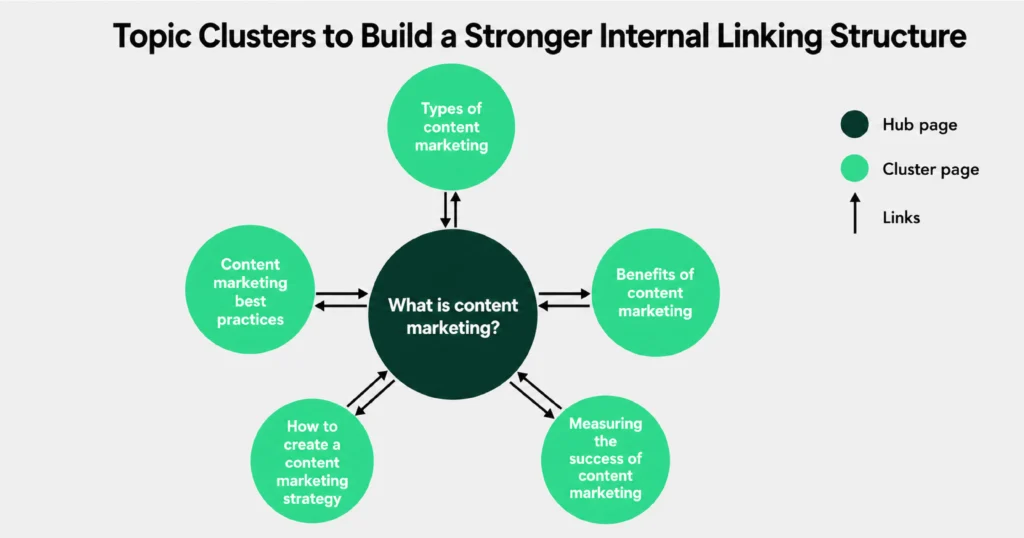
A topic cluster is an SEO strategy that organizes related content around a central pillar page. The pillar page covers a broad topic, while supporting articles explore specific subtopics and link back to the main page and to each other where relevant. This creates a logical internal linking structure that improves navigation and helps search engines better understand your website’s topical authority.
How Topic Clusters Strengthen Internal Linking
- Connect Related Content: Links pages covering similar topics, creating a clear and organized content network.
- Strengthen Pillar Pages: Supporting articles pass internal link equity back to the main pillar page, improving its authority.
- Improve Content Discovery: Makes it easier for users and search engines to find related pages.
- Reduce Orphan Pages: Ensures supporting content is connected through relevant internal links.
- Distribute Link Equity: Shares SEO value across related pages instead of concentrating it on a few URLs.
- Enhance User Experience: Encourages visitors to explore more content by providing logical next steps within the same topic.
Best Tools to Audit and Improve Your Internal Links
Regularly auditing your internal links helps identify broken links, orphan pages, weak site structure, and missed linking opportunities. The right SEO tools can simplify this process by analyzing your website, highlighting issues, and providing recommendations to strengthen your internal linking strategy.
- Google Search Console: Monitor indexed pages, identify crawl issues, and discover pages that may need better internal linking.
- Screaming Frog SEO Spider: Crawl your website to find broken internal links, redirect chains, orphan pages, and other linking issues.
- Ahrefs Site Audit: Analyze your internal link structure, detect link opportunities, and identify pages with weak internal link coverage.
- Semrush Site Audit: Evaluate your website’s internal linking health, uncover crawlability issues, and receive actionable SEO recommendations.
- Yoast SEO (WordPress): Suggests relevant internal links while you write content, making it easier to build a strong linking structure.
- Link Whisper: Automatically recommends internal linking opportunities and helps add relevant links across your website more efficiently.
Improve Your Internal Linking with The Maddex
A strong internal linking strategy helps users navigate your website, improves crawlability, and distributes link equity to important pages. Following proven best practices can strengthen your site structure and support long-term SEO growth.
The Maddex helps businesses build effective internal linking strategies that improve website architecture and organic performance. From site audits to SEO optimization, our team creates data-driven solutions that enhance rankings and deliver a better user experience.