
Knowing how visitors interact with your website is crucial for improving user experience and boosting search engine rankings. This is where an SEO heat map comes into play. An SEO heat map visually represents user behavior on your site, showing which areas get the most clicks, attention, and engagement.
By analyzing these insights as part of professional SEO services, website owners and marketers can optimize content placement, improve navigation, and enhance overall site performance to drive better SEO results.
Types of Heatmap
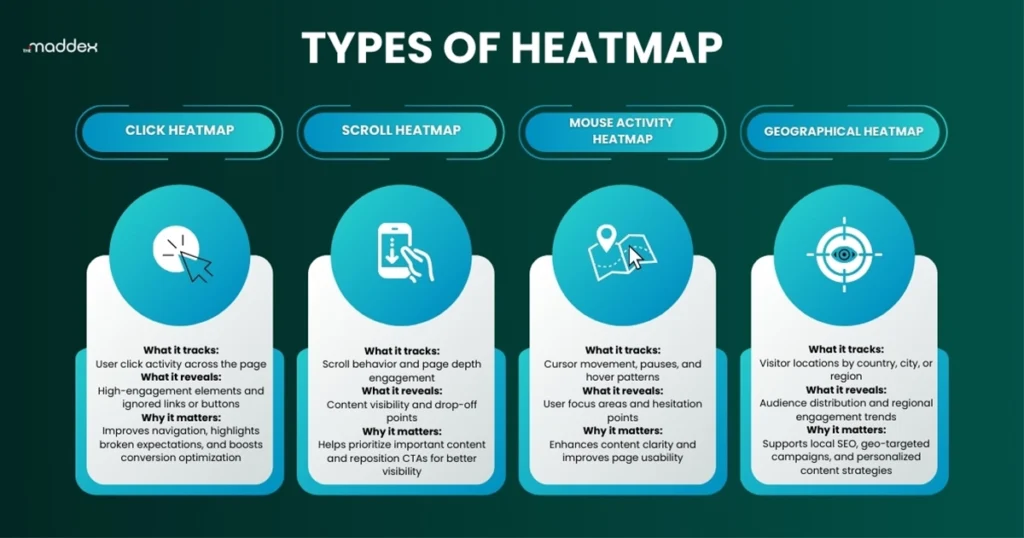
Heatmaps are widely used in web analytics, including SEO, to gain insights into how users interact with a website. By visually representing user behavior, heatmaps help identify which areas of a page attract attention and which are overlooked. There are several types of heatmaps, each offering unique insights:
- Click Heatmap: Shows where visitors click the most on a page, helping you identify popular buttons, links, and interactive elements.
- Scroll Heatmap: Displays how far down users scroll, allowing you to see if important content is being missed.
- Mouse/Movement Heatmap: Tracks where users hover or move their cursor, often indicating areas of interest or confusion.
- Geographical Heatmaps: Show the geographic locations of website visitors, helping you understand where your audience comes from and optimize content, keywords, and campaigns for local SEO targeting.
Benefits of Heatmaps for SEO
Using a heatmap in SEO provides valuable insights into how visitors interact with your website. By analyzing user behavior visually, you can make data-driven decisions to improve both engagement and search engine performance. Here are the key benefits of using a heatmap for SEO:
- Improve User Experience (UX): Heatmaps show which parts of your webpage attract the most attention and which are ignored. By optimizing layout, content placement, and navigation based on user behavior, you can make your site more intuitive and engaging.
- Boost Engagement and Conversions: By identifying the areas users click or interact with most, you can place important CTAs (calls-to-action), buttons, or links strategically to increase conversions, sign-ups, or sales.
- Optimize Content Placement: Heatmaps reveal which content gets noticed and which doesn’t. This helps in restructuring pages, highlighting key information, and ensuring that important messages aren’t missed by visitors.
- Reduce Bounce Rate: If users aren’t scrolling far or clicking on key sections, heatmaps show where attention drops. Addressing these areas can keep visitors on your site longer, signaling to search engines that your content is valuable.
- Inform SEO Strategy: Search engines value user engagement metrics like time on page and interaction. By using an SEO heat map, you can refine content layout and design to improve these metrics, indirectly boosting your search rankings.
- Identify UX Issues Quickly: Heatmaps can highlight areas where users are confused, clicking non-clickable elements, or missing key content. Fixing these issues improves usability and reduces frustration.
Heatmaps vs Google Analytics: What’s the Difference?
Heatmaps and Google Analytics both help analyze website performance, but they serve different purposes and offer unique insights.
Heatmaps provide a visual representation of user behavior, showing where visitors click, scroll, and focus on a page. They help you understand how users interact with specific elements and identify UX or layout issues.
Google Analytics, on the other hand, focuses on quantitative data such as traffic sources, page views, bounce rate, session duration, and conversions. It helps you understand what is happening on your website and how users arrive and move through it.
When used together, heatmaps and Google Analytics create a complete picture. Google Analytics shows the numbers, while heatmaps explain the behavior behind those numbers, making them both essential for effective SEO and optimization.
How to Use Heatmaps for SEO
Using heatmaps effectively can help you optimize your website for both users and search engines. Here’s how you can leverage them:
- Analyze User Clicks: Look at click heatmaps to see which buttons, links, or images get the most interaction. Ensure that important CTAs and internal links are placed where users are most likely to click.
- Track Scrolling Behavior: Scroll heatmaps show how far users scroll on your pages. If key content is placed too far down, consider moving it higher to ensure it’s seen, improving engagement and dwell time.
- Understand Attention with Mouse Movement: Mouse movement or hover heatmaps indicate where visitors focus their attention. Use this to highlight important content or simplify confusing sections.
- Optimize Page Layout and Content: Combine insights from different heatmaps to rearrange content, improve navigation, and eliminate clutter. A well-structured page keeps users engaged and reduces bounce rates.
- Test and Iterate: Use heatmaps alongside A/B testing to experiment with different layouts, button placements, or content strategies. Continuously optimizing based on real user behavior can boost both SEO performance and conversions.
Common Mistakes to Avoid
While heatmaps are powerful tools, misinterpreting the data or using them incorrectly can lead to poor decisions. Here are common mistakes to watch out for:
- Relying on Small Sample Sizes: Using heatmaps with too few visitors can give misleading insights. Make sure your data comes from a statistically significant number of users to get accurate results.
- Ignoring Mobile Users: Many heatmaps focus only on desktop behavior. Since mobile traffic is often higher, neglecting mobile user behavior can result in missed opportunities for optimization.
- Overlooking Context: Heatmaps show where users interact, but not why. Always combine heatmap data with analytics, user feedback, or A/B testing to understand the reasons behind user behavior.
- Making Major Changes Too Quickly: Don’t restructure your website based on a single heatmap snapshot. Trends over time provide more reliable insights for improving UX and SEO.
- Focusing Only on Clicks: Clicks are important, but attention can also be visual (hover, scroll, or reading behavior). Relying only on clicks may overlook key areas that influence engagement.
- Ignoring SEO Metrics: While heatmaps improve UX, they should complement SEO metrics like bounce rate, dwell time, and conversions. Ignoring these can limit the impact on your search rankings.
How Local SEO Heatmaps Improve Our Client Results
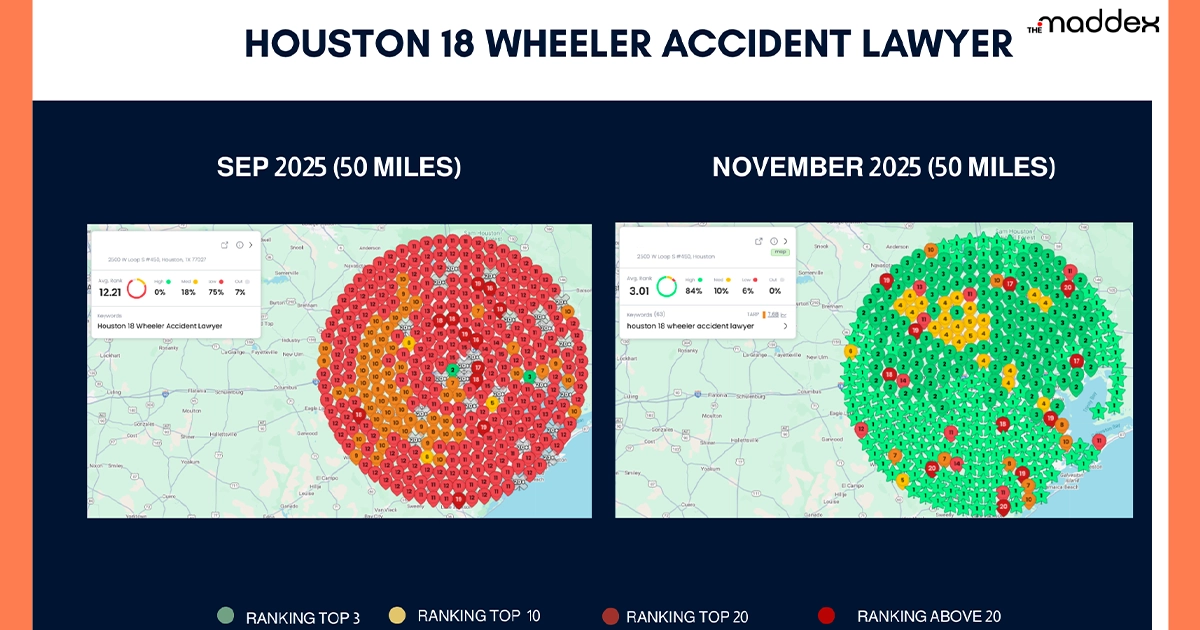
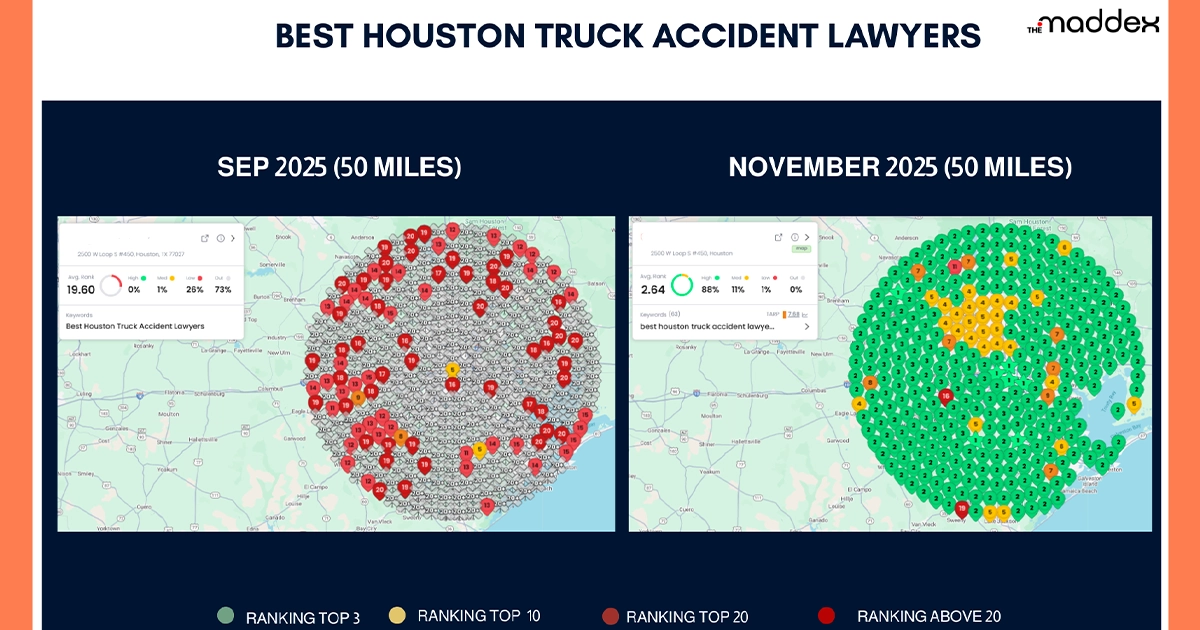
Through heatmap analysis, we’ve helped businesses improve local SEO performance by identifying high-engagement areas and optimizing key location-based content. For on-page SEO factors, we use Microsoft Clarity to understand how users click, scroll, and interact with web pages, allowing us to fix UX gaps and strengthen on-page optimization. These insights lead to better engagement, lower bounce rates, and higher local search visibility.
Discover how heatmaps drive local SEO and on-page improvements through real user interaction insights in the images below.
Boost Your SEO with Expert Heatmap Analysis
The Maddex provides professional SEO services, including detailed SEO heat map analysis, to help you understand visitor behavior, optimize content, and increase conversions. With data-driven insights, you can enhance user engagement and improve your search rankings effectively.
Call The Maddex today at (844) 977 2956 and turn visitor behavior into actionable results!