A slow website can frustrate visitors, increase bounce rates, and limit your search visibility. If you are wondering how important page speed is for SEO, website performance plays a key role in user experience, rankings, and online success. This blog explains how page speed affects SEO and how businesses can optimize their website speed.
For Houston businesses, maintaining a fast website is essential for improving online visibility and staying competitive. Partnering with a trusted “seo agency Houston” can help identify technical issues, optimize page load time, and create a smoother experience for users and search engines.
What Is Page Speed?
Page speed measures how quickly a webpage loads and becomes interactive for visitors. It includes factors such as images, scripts, videos, and other elements that affect website loading speed. A slow page load time can negatively impact user experience, engagement, and SEO performance. Optimizing technical factors like Core Web Vitals and website performance helps create faster, more user-friendly websites.
What Makes a Website Slow?
Several technical issues can negatively impact website loading speed. Large images, unnecessary scripts, outdated code, and poor server performance are some of the most common reasons websites take longer to load.
Common causes of slow websites include:
- Unoptimized images and large media files
- Too many third-party scripts and tracking tools
- Excessive CSS or JavaScript files
- Poor-quality hosting infrastructure
- Lack of browser caching
- Too many plugins or website extensions
Does Page Speed Affect SEO?
Yes, page speed affects SEO because it impacts user experience, engagement, and search visibility. Google considers performance signals like Core Web Vitals to evaluate how users experience a website. A slow website can increase bounce rates, while faster pages improve usability and engagement. Optimizing website speed helps businesses support better rankings, conversions, and long-term SEO performance.
Why Is Page Speed Important for SEO and Website Success?
Page speed affects SEO, user experience, and conversions by helping visitors access information faster. Google found that as page load time increases from 1 second to 10 seconds, the probability of mobile users leaving a website increases by 90%. A fast website helps businesses improve engagement, build trust, and provide better customer experiences. Optimizing website speed supports stronger search performance and business growth.
1. Improves User Experience and Engagement
A fast website helps visitors access information quickly and creates a smoother browsing experience. When pages load without delays, users are more likely to explore content and interact with your website. Slow loading times can frustrate visitors and negatively impact brand perception. Improving website speed helps businesses keep users engaged and satisfied.
2. Supports Mobile SEO Performance
Mobile users expect websites to load quickly across different devices and network conditions. Since Google uses mobile-first indexing, website performance on smartphones is essential for SEO success. Optimizing images, reducing unnecessary code, and improving server response times can enhance mobile page speed. A faster mobile experience helps increase engagement and visibility.
3. Increases Conversions and Business Results
Website speed plays an important role in influencing customer actions, including purchases, inquiries, and form submissions. Faster websites create a convenient experience that encourages visitors to stay and complete desired actions. Slow pages can lead to lost opportunities and reduced conversions. Improving page speed supports better SEO performance and business growth.
What Is an Ideal Page Load Speed for SEO?
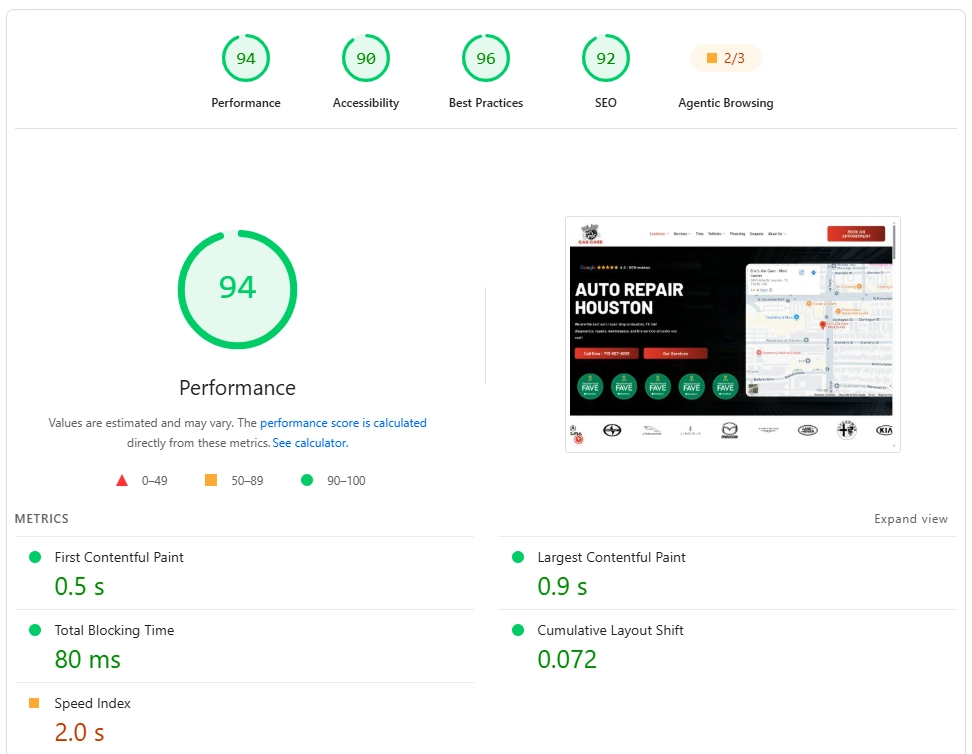
The ideal page load speed for SEO is under 2.5 seconds, as faster websites provide better user experiences and support stronger search performance. While page speed alone does not guarantee higher rankings, Google recommends focusing on Core Web Vitals to measure real-world website performance.
For optimal performance, websites should aim for:
- Largest Contentful Paint (LCP): Within 2.5 seconds
- Interaction to Next Paint (INP): Less than 200 milliseconds
- Cumulative Layout Shift (CLS): Less than 0.1
These Core Web Vitals metrics help evaluate how quickly and smoothly users can interact with a website. Meeting these benchmarks does not guarantee top rankings, but it improves overall page experience and usability.
How to Check Page Speed
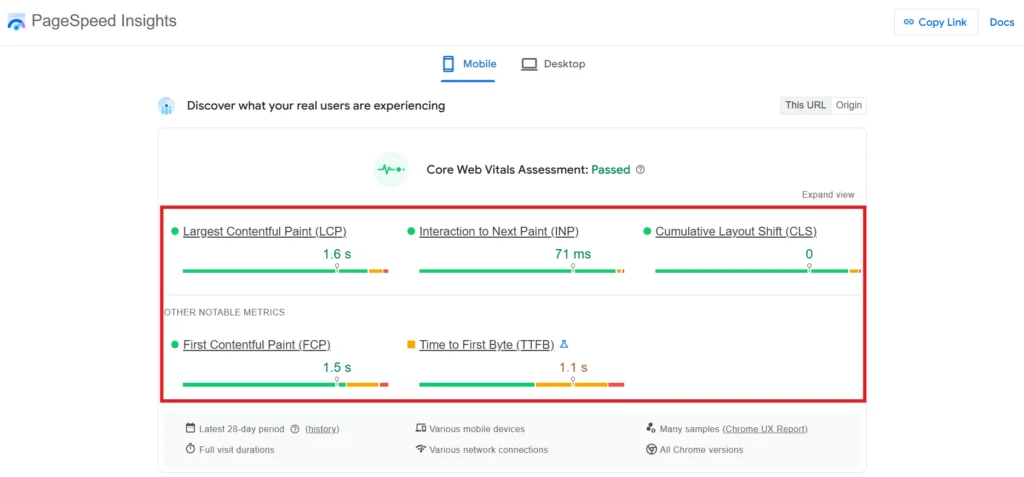
Before making improvements, businesses need to understand their current performance. Speed testing tools analyze website elements, identify technical problems, and provide recommendations for improvement.
Best Tools to Check Website Speed
Several reliable tools can help measure page speed and identify optimization opportunities:
- Google PageSpeed Insights: Provides performance scores and Core Web Vitals analysis.
- Lighthouse: An open-source auditing tool that evaluates website quality, including performance and accessibility.
- GTmetrix: Provides detailed reports on loading performance and optimization recommendations.
- WebPageTest: Offers advanced testing options for analyzing website speed.
Regular testing helps businesses track improvements and identify new performance issues as websites grow.
How to Increase Page Speed
Improving page speed requires a combination of technical adjustments and ongoing monitoring. Businesses should focus on optimizing website resources, improving server performance, and reducing unnecessary elements.
1. Use Static Site Generation
Static site generation creates pre-built pages that load faster by reducing server processing time. Instead of generating pages with every request, websites can deliver ready-made files instantly to users. This approach improves website loading speed and creates a smoother browsing experience. It is especially useful for content-heavy websites that need faster delivery.
2. Minify Code and Remove Unnecessary Files
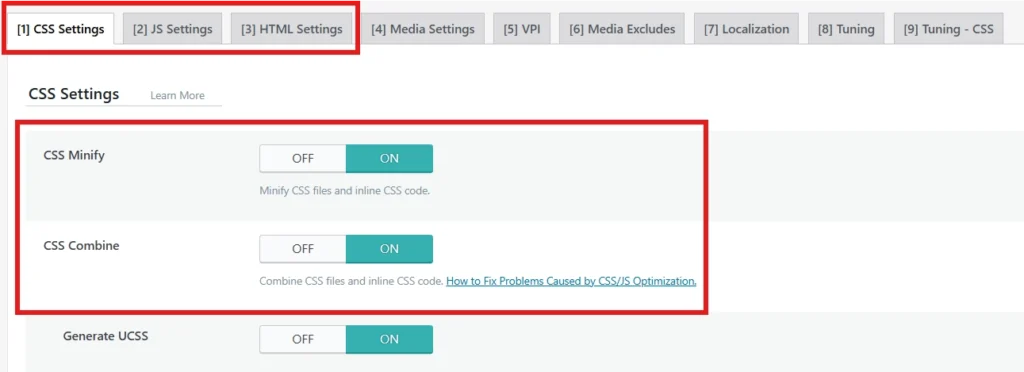
Large HTML, CSS, and JavaScript files can slow down website performance by increasing loading time. Code minification removes unnecessary characters and reduces file sizes without affecting functionality. This allows browsers to process resources faster and improves page load speed. Removing unused code also helps create a cleaner website structure.
How to Minify Code and Remove Unnecessary Files:
- Use plugins like LiteSpeed Cache, WP Rocket, or Autoptimize to minify HTML, CSS, and JavaScript files.
- Remove unused CSS and JavaScript files that increase page load time.
- Combine and compress website files to reduce the number of browser requests.
- Disable unnecessary plugins, scripts, and features affecting website performance.
- Regularly audit and clean outdated code to maintain faster website speed.
3. Implement Browser Caching
Caching stores frequently used website resources so they load faster for returning visitors. Instead of downloading the same files repeatedly, browsers can access stored versions to reduce loading time. Effective caching improves website performance and user experience. It is an important part of Website Performance Optimization strategies.
4. Optimize Images
Large and unoptimized images can significantly slow down website loading speed. Compressing images, using modern formats like WebP, and reducing unnecessary media files can improve performance. Optimized visuals maintain quality while reducing page size. This helps websites load faster and provide a better user experience.
5. Choose Reliable Hosting
Website hosting directly affects server response time, speed, and reliability. Poor hosting can lead to slow loading times, downtime, and limited performance. Choosing a reliable hosting provider ensures better resources and faster website delivery. Quality hosting creates a strong foundation for improving website speed.
6. Use a Content Delivery Network (CDN)
A Content Delivery Network (CDN) stores website files across multiple servers to deliver content faster. Popular CDNs like Cloudflare, Bunny CDN, and Amazon CloudFront reduce latency by serving content from the server closest to each visitor. These CDNs are known for their fast global networks and low loading times, helping improve website speed and reliability. They are especially valuable for businesses serving customers across multiple locations.
How to do it?
- Create an account with a CDN provider such as Cloudflare, Bunny CDN, or Amazon CloudFront.
- Copy the nameservers (DNS records) provided by the CDN and update them in your domain or cPanel DNS settings (depending on your hosting provider).
- Enable CDN caching, image optimization, and compression features from the CDN dashboard.
- Test your website using Google PageSpeed Insights or GTmetrix to confirm the speed improvements.
Improving page speed requires ongoing optimization and technical expertise to achieve the best results. If you need professional support, partnering with a “digital marketing agency Houston” can help identify performance issues, implement advanced speed optimization strategies, and improve your website’s SEO and user experience.
Common Page Speed Mistakes
Many businesses struggle with slow websites because they overlook basic optimization issues. Avoiding common mistakes can help maintain better performance.
Common page speed mistakes include:
- Ignoring mobile website performance
- Uploading large, uncompressed images
- Using excessive plugins
- Adding too many third-party scripts
- Avoiding regular performance testing
- Using outdated website technology
Regular monitoring helps prevent performance problems from affecting SEO results. A website should be continuously optimized as content, features, and technology change.
Improve Page Speed With Maddex’s Optimization Solutions
Page speed is a critical part of modern SEO because it affects rankings, user experience, mobile performance, and business growth. Understanding how important page speed is for SEO helps businesses prioritize technical improvements that create faster, more effective websites.
If your website struggles with slow loading times, technical issues, or poor Core Web Vitals performance, professional optimization can help identify the right solutions. Maddex helps businesses improve digital performance through strategic SEO and technical optimization services designed to support better visibility and user experiences. A faster website is not just about improving rankings; it is about creating a stronger online presence that delivers value to customers.