Many website owners open Google Analytics expecting to see the exact keywords driving organic traffic, only to find “(not provided)” instead. If you’ve experienced the same frustration, you’re not alone. Understanding where your visitors come from is essential for improving your SEO strategy and growing your website.
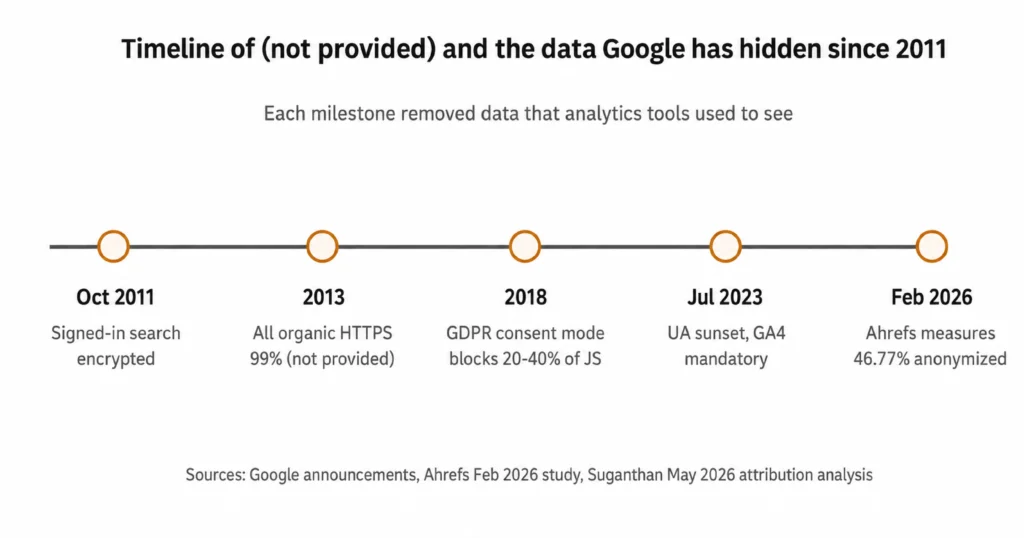
Nearly 46.77% of search queries are anonymized before reaching Google Search Console, according to an Ahrefs analysis of 22 billion clicks across more than 887,000 GSC properties. That’s why Google Analytics often displays “(not provided)” instead of the actual search terms.
While connecting Google Search Console with GA4 is a good start, it doesn’t reveal everything. This guide covers five more ways to uncover hidden keyword data, and how an experienced SEO agency Houston businesses trust can help fill the gaps.
What “(not provided)” Actually Means in 2026
“(Not provided)” is the label Google Analytics shows when the organic search query that brought a visitor to your site is encrypted before reaching your analytics property. Google introduced this privacy measure in 2011, and after moving all organic searches to HTTPS in 2013, search keywords stopped being passed through referrer data.
This is an intentional privacy policy, not a tracking error or GA4 issue. No Analytics setting or plugin can recover the missing keywords because the connection between the query and the session is removed before the data reaches your website. The query data is still available in Google Search Console, where it is reported in aggregate, retained for up to 16 months, and partially anonymized to protect user privacy.
Why GA4 Didn’t Restore Organic Keyword Visibility?
Many users expected GA4 to bring back organic keyword data, but that was never possible because the limitation comes from Google’s privacy policy, not from Google Analytics itself. Since the search query is removed before the visit reaches your website, GA4 has no access to the original keyword.
Instead of showing individual search terms, GA4 focuses on user behavior, conversions, and engagement metrics. To analyze organic keywords, you must use Google Search Console alongside GA4, as Search Console provides aggregated query data while still protecting user privacy.
Also Read: What keywords Does My Site Rank For
The 6 Keyword Visibility Methods, Ranked by What Each One Actually Unlocks
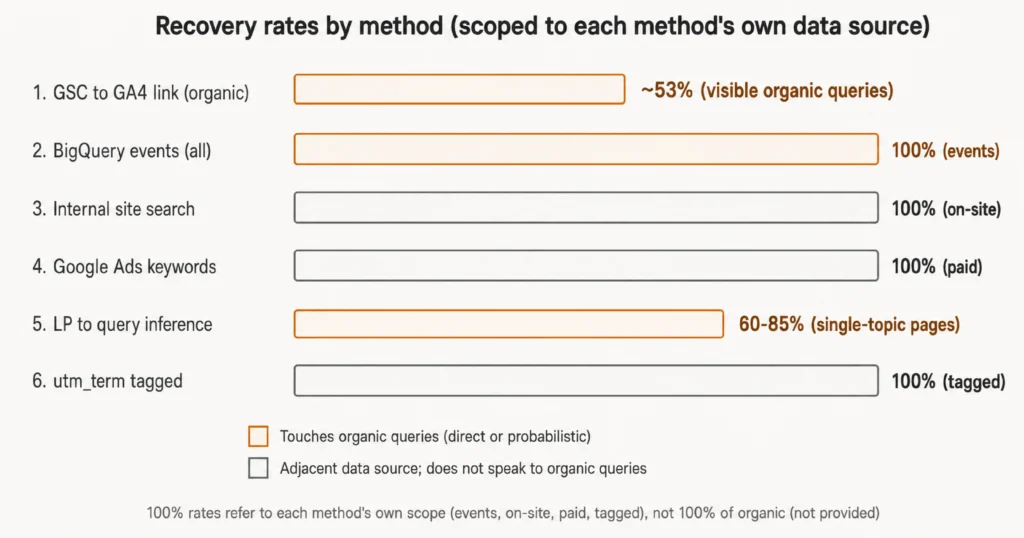
No single method can fully recover “(not provided)” keywords. Only two methods directly help uncover organic search queries, while the other four provide insights from related sources such as paid campaigns, on-site searches, tagged URLs, and raw analytics data. Used together, they create a much clearer picture of user search intent.
The table below ranks each method by what it actually reveals. Pay close attention to whether it directly touches organic search data, because a high recovery rate usually refers to that method’s own data source, not to all hidden organic keywords.
| Method | Touches Organic? | Recovery Rate | What It Actually Unlocks |
| 1. Link Google Search Console to GA4 | Yes (Direct) | ~53% | Shows non-anonymized organic queries. |
| 2. BigQuery Export + SQL Joins | Yes (Indirect) | 100% of GA4 events | Captures all GA4 events, not hidden queries. |
| 3. Internal Site Search | No | 100% of on-site searches | Shows on-site search terms. |
| 4. Google Ads Keyword Data | No | 100% of paid clicks | Shows Google Ads keywords only. |
| 5. Landing Page to Query Inference | Yes (Estimated) | 60–85% | Estimates keywords from landing pages. |
| 6. UTM Term Tracking for Manual Campaigns | No | 100% of tagged campaigns | Tracks keywords from tagged campaigns. |
Start here
- If you have not linked Search Console to GA4, start with Method 1.
- If you run Google Ads, add Method 4 next.
- If your team is comfortable with SQL, use Method 2 to join GA4, GSC, and landing-page data.
- If you do not have SQL support, use Method 5 as a spreadsheet-based approximation.
Method 1: Link Search Console to GA4
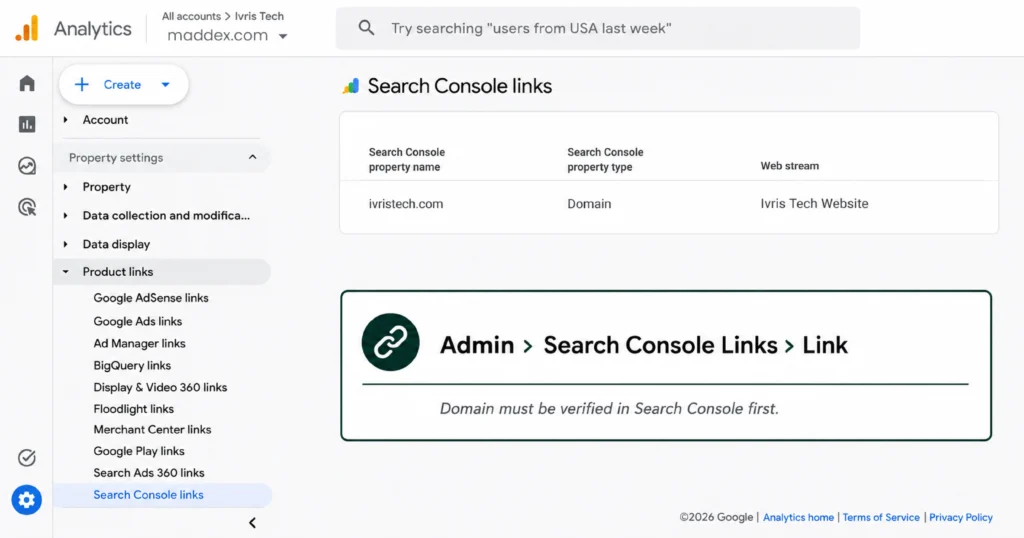
Connecting Google Search Console to GA4 is the most effective way to recover available organic keyword data. Since Google anonymizes about 46.77% of search queries for privacy, this integration can reveal roughly 53% of the organic queries that remain visible.
After linking a verified Search Console property, keyword reports usually appear in GA4 within 24 hours. You’ll be able to see queries, impressions, clicks, CTR, and average position for landing pages, but not the exact keyword tied to an individual user session.
Also Read: Keyword Rankings: How to Track & Improve Your SEO Performance
Method 2: Build a BigQuery Export Pipeline
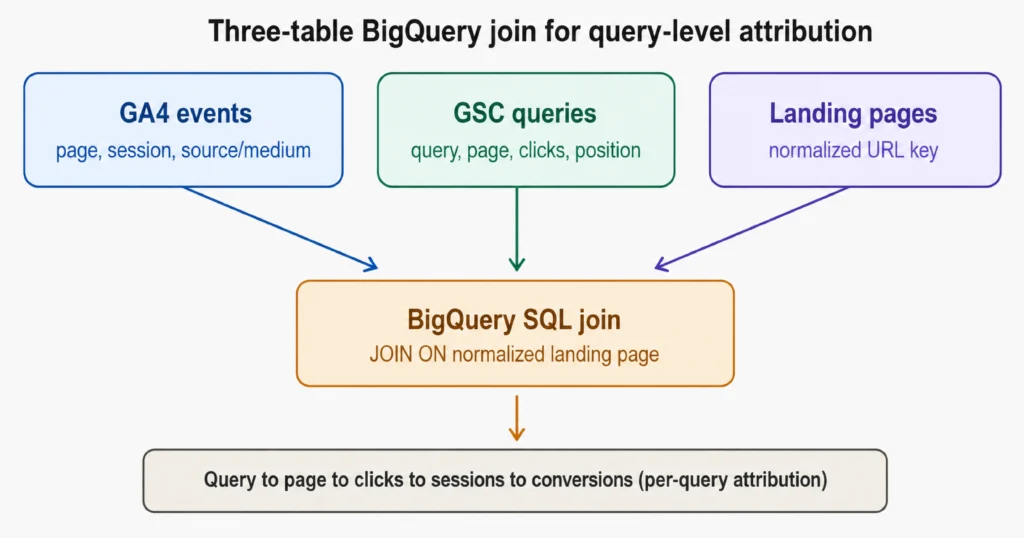
GA4’s BigQuery export sends every event to BigQuery without sampling, giving you complete access to your analytics data. While it cannot reveal hidden “(not provided)” keywords, it allows you to combine GA4 events with Google Search Console and landing page data for deeper SEO analysis.
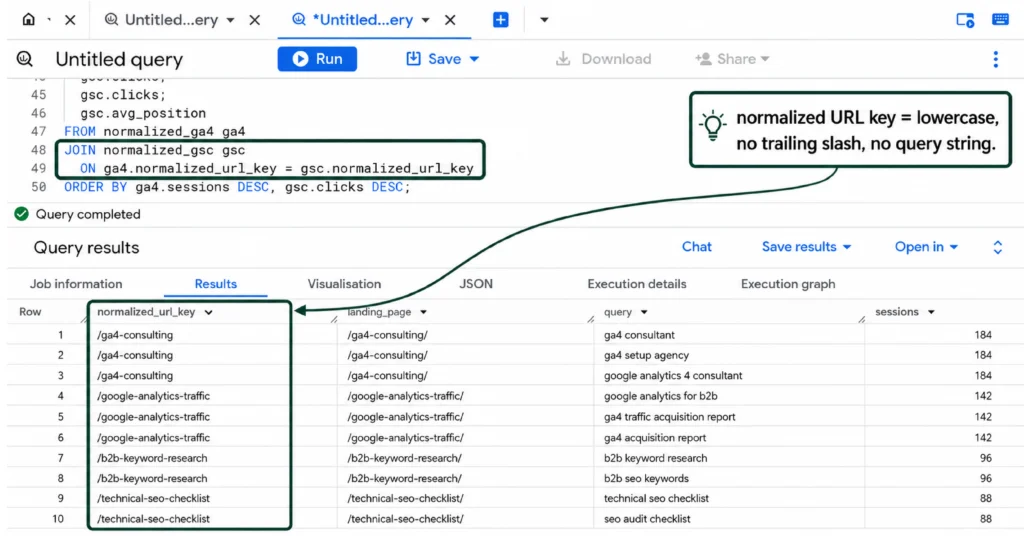
As shown above, BigQuery exports 100% of GA4 events without sampling and uses a normalized URL key (lowercase, no trailing slash, or query string) to join GA4 and Google Search Console data. This matches landing pages with search queries and session data for stronger attribution, although it does not recover hidden “(not provided)” keywords.
Method 3: Track Internal Site Search
Internal site search captures 100% of the searches users perform on your website after they arrive. Once Site Search is enabled in GA4, every on-site search term is recorded, giving you valuable insight into what visitors are looking for.
While these are not the original Google search queries, they reveal user intent after landing on your site. Comparing these search terms with your top landing pages can help identify content gaps and estimate the keywords that may have brought users to your website.
Method 4: Pull Google Ads Keyword Data
Linking Google Ads with GA4 gives you 100% visibility into paid search keywords for Google Ads traffic. Once connected and auto-tagging is enabled, GA4 records keyword, campaign, and ad group data for every paid click.
This method does not recover organic “(not provided)” keywords, but it provides complete keyword data for paid campaigns. If you target the same keywords in both paid and organic search, Google Ads data can help you better understand search intent and SEO opportunities.
Method 5: Map Landing Pages to GSC Queries
This method matches GA4 landing pages with Google Search Console queries to estimate which keywords likely drove organic traffic. As shown above, each landing page is paired with its top queries, GSC clicks, GA4 sessions, click share, and a confidence score. Single-topic pages can achieve 60–85% inference accuracy, while broader pages produce lower-confidence estimates.
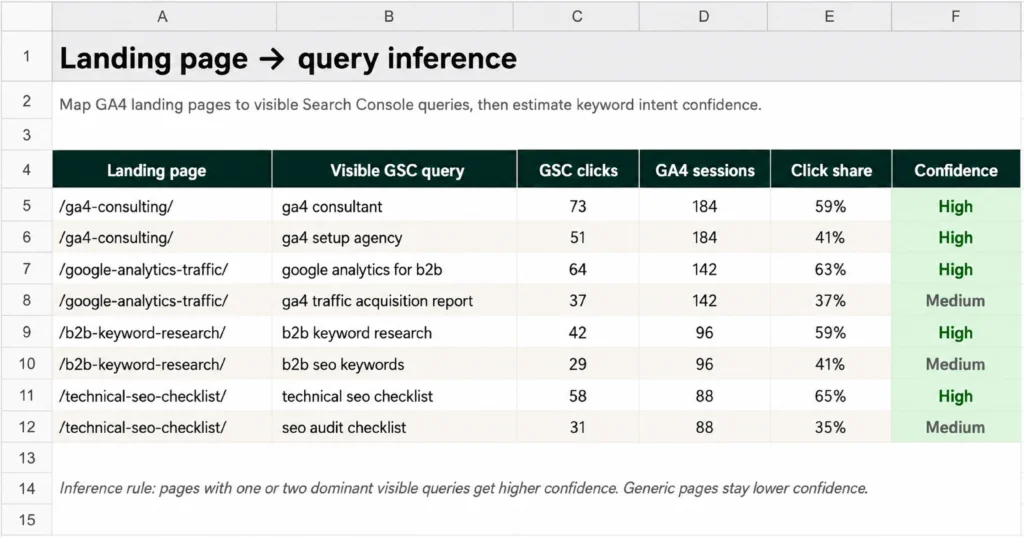
By exporting GA4 and Search Console data and matching them by URL, you can identify the most likely keywords behind each landing page. Although this method cannot recover “(not provided)” keywords directly, it is one of the best ways to estimate search intent and connect keywords with conversions.
Method 6: Tag Manual Campaigns With UTM Term
The utm_term parameter lets GA4 capture 100% of keyword data for properly tagged manual campaigns, including Bing Ads, paid social, email newsletters, affiliate links, and partner campaigns. However, it does not work for Google organic search, because Google removes keyword data before visitors reach your website.
To get accurate data, every campaign URL should include consistent utm_source, utm_medium, utm_campaign, and utm_term parameters. Missing or inconsistent UTM tags create permanent reporting gaps, so auditing campaign URLs before launch is essential for reliable tracking.
Which Method to Use?
The best recovery method depends on your traffic sources, technical expertise, and reporting needs. Use the table below to identify the methods that best match your website and focus on the ones that provide the greatest value for your setup.
| Website Profile | Start With | Add If Needed | Skip |
| Small business (Organic only) | Methods 1, 3, 6 | Method 5 | Methods 2, 4 |
| Small business (Organic + Paid) | Methods 1, 4, 6 | Method 5 | Method 2 |
| Mid-size business (SQL team) | Methods 1, 2, 4, 6 | Method 5 | None |
| Enterprise | All 6 methods | – | None |
| Content-focused website | Methods 1, 5 | Method 2 (if SQL support) | Methods 3, 4, 6 |
Method 1 should always come first because it is free, quick to set up, and provides the maximum amount of visible organic keyword data available. Method 2 (BigQuery) is best for teams with SQL expertise, as its value depends on your ability to analyze and join data.
The best results come from combining methods instead of relying on one alone. For most businesses, Methods 1, 4, and 6 provide the strongest foundation, while Methods 2 and 5 add deeper attribution and keyword insights. A trusted digital marketing agency Houston can also help ensure source/medium tracking is accurate for reliable reporting.
Improve Your Keyword Insights with The Maddex
Finding “(not provided)” keywords doesn’t have to limit your SEO strategy. By combining GA4, Google Search Console, and the right analysis methods, you can uncover valuable search insights, make better optimization decisions, and improve your organic performance.
The Maddex helps businesses overcome keyword visibility challenges with data-driven SEO strategies, advanced analytics, and accurate performance tracking. Whether you need GA4 setup, Search Console integration, or expert SEO support, our team can help you turn hidden data into measurable growth.